mirror of
https://github.com/UnnoTed/wireguird
synced 2026-07-25 17:24:46 -04:00

45 lines
1.4 KiB
Markdown
45 lines
1.4 KiB
Markdown
# wireguird
|
|
|
|
##### a linux gtk gui client for [Wireguard](https://www.wireguard.com/)
|
|
|
|
________________
|
|
Features:
|
|
|
|
- System tray icon goes red when connected, black when disconnected.
|
|
- Looks the same and does almost the same things as the official Wireguard's Windows gui client.
|
|
- Lists tunnels from `/etc/wireguard`
|
|
- Controls Wireguard ~~*through*~~ `wg-quick`
|
|
|
|
## Preview (video)
|
|
|
|
[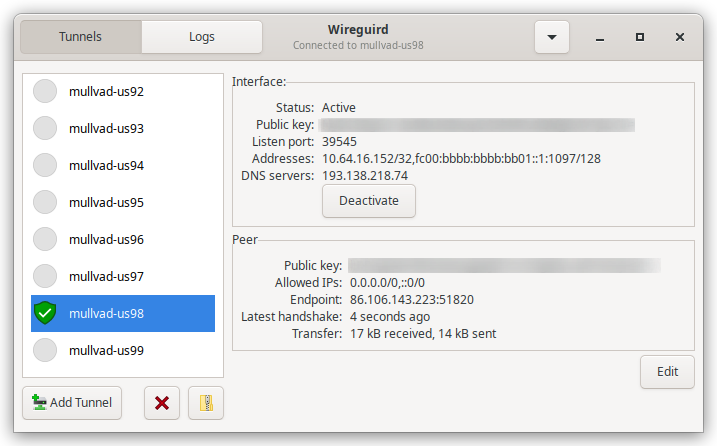](https://streamable.com/dpthpr)
|
|
|
|
## Download
|
|
|
|
v0.2.0 tested on: Ubuntu `18.04 LTS`, `20.04 LTS` and `21.04`
|
|
|
|
[wireguird_amd64.deb (1.8mb)](https://github.com/UnnoTed/wireguird/releases/download/v0.2.0/wireguird_amd64.deb)
|
|
|
|
v1.0.0 tested on: Ubuntu `22.04 LTS` and `22.10`, Linux Mint `21.1`
|
|
|
|
[wireguird_amd64.deb (2.6mb)](https://github.com/UnnoTed/wireguird/releases/download/v1.0.0/wireguird_amd64.deb)
|
|
|
|
v1.1.0 tested on: Ubuntu `23.04`
|
|
|
|
[wireguird_amd64.deb (2.6mb)](https://github.com/UnnoTed/wireguird/releases/download/v1.1.0/wireguird_amd64.deb)
|
|
```sh
|
|
wget https://github.com/UnnoTed/wireguird/releases/download/v1.1.0/wireguird_amd64.deb
|
|
sudo dpkg -i ./wireguird_amd64.deb
|
|
```
|
|
|
|
## Compile
|
|
|
|
deb dependencies: `sudo apt install wireguard-tools libgtk-3-dev libayatana-appindicator3-dev golang-go resolvconf`
|
|
|
|
```sh
|
|
git clone https://github.com/UnnoTed/wireguird
|
|
cd wireguird
|
|
go install github.com/goreleaser/goreleaser/v2@latest
|
|
goreleaser release --snapshot --clean
|
|
```
|